WordPress 2.5 Widescreen Version

Filed Under development |   

I have discussed in an article under WordPress 2.5 in widescreen display abnormal. Almost all of the interface of WordPress 2.5 are directed at the design of the 1024 × 768. When I use my 1440 × 900 widescreen monitor will show only the left side of the body. I’ve finally managed to get my 1440×900 widescreen monitor working with the WordPress 2.5.

Open file wordpress\wp-admin\css\global.css, in line 159, replace:

max-width: 980px;

to:

max-width: 1400px;

In line 166, replace:

max-width: 950px;

to:

max-width: 1400px;

That’s it. Before the modification, we can see that the interface of WordPress 2.5 in 1440 × 900 like this:
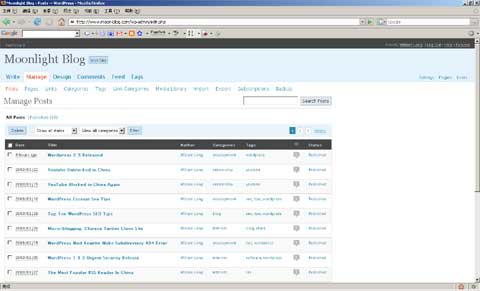
WordPress 2.5 Widescreen Version

After the modification, we can see that the interface of WordPress 2.5 in 1440 × 900 like that. It’s so cool, isn’t it.

WordPress 2.5 Widescreen Version

If you are using the 1440 × 900 display resolution, you can changes the code and make a better look in WordPress 2.5 Widescreen Version.

Related posts


Comments

3 Responses to “WordPress 2.5 Widescreen Version”

  1. Nicolas Boettcher on December 4th, 2008 10:04 am

    I want to do this but in the version 2.7
    I don’t found the same variables to change these values. Can you help me?

  2. William Long on December 12th, 2008 12:23 am

    in the version 2.7 , you do not need change anything, it’s support wide-screen.

  3. WordPress 2 5 Widescreen Version Moonlight Blog | Wood TV Stand on May 31st, 2009 4:07 pm

    [...] WordPress 2 5 Widescreen Version Moonlight Blog Posted by root 1 hour 22 minutes ago (http://www.moon-blog.com) I have discussed in an article under wordpress 2 5 in widescreen display wordpress plugin keyword filter 5 wordpress plugin comment filter 9 Discuss  |  Bury |  News | WordPress 2 5 Widescreen Version Moonlight Blog [...]

Leave a Reply