All in all it was a fairly busy but very satisfying year of blogging here at Moonlight Blog. Thanks to the many readers who have contributed either with guest posts, comments, emails and tip offs. I'm looking forward to yet another great year in 2008.
Monday, December 31, 2007
Best of Moonlight Blog 2007
As we move into 2008 I thought it might be fun to look back quickly on the year that was with a top 20 post of the most popular posts published on Moonlight Blog this year (according to page views on Google Analytics). I hope you enjoy this trip back through the year of 2007 at Moonlight Blog.
Wordpress Plugin: Chinese PinYin Slug - 2,467 views
Survival For Standalone Blogs - 1,682 views
China Internet Censorship Goes Crazy - 1,682 views
The Secret Of Internet Censorship In China - 1,461 views
FeedBurner Blocked By China - 1,276 views
FeedBurner Is Completely Blocked In China - 1,201 views
Google Answers Censorship In China - 1,082 views
About This Blog - 1,041 views
Baidu Hijacking Google, Yahoo, Microsoft In China - 1,019 views
Google Launches Chinese Blog Search - 1,014 views
YouTube Blocked In China - 986 views
WordPress MU AdSense Plugin - 944 views
WordPress Plugin: Post2Mail, Send Post to Email - 693 views
How To Visit Google BlogSpot In China - 670 views
WordPress Plugin: Yearly Blog Stats - 625 views
Wordpress Plugin: Keyword Filter - 615 views
WordPress Plugin: MySQL Server Crash Monitor - 552 views
YouTube, Have a Merry Halloween - 540 views
WordPress Plugin: WP-PostViews JavaScript Edition - 526 views
About - 520 views
All in all it was a fairly busy but very satisfying year of blogging here at Moonlight Blog. Thanks to the many readers who have contributed either with guest posts, comments, emails and tip offs. I'm looking forward to yet another great year in 2008.
All in all it was a fairly busy but very satisfying year of blogging here at Moonlight Blog. Thanks to the many readers who have contributed either with guest posts, comments, emails and tip offs. I'm looking forward to yet another great year in 2008.
Saturday, December 29, 2007
WordPress Plugin: Yearly Blog Stats
Yearly Blog Stats is the easy way to display the total year number of blog posts, comments and other stats from anywhere within your blog. One file, easy to use.
With Yearly Blog Stats, you display only the information you want, where you want. This plugin is highly flexible, simple to use, and completely free.
Display any or all of the provided site statistics — customize your own set to provide only the statistics you want.
Features:
1. Total number of posts in this year
2. Total number of comments in this year
3. Most views post each month in this year
Installation and Usage
Unzip wp-stats.zip and copy wp-stats.php to your WordPress root directory.
Download Latest:
Click here to download the latest version of WordPress Yearly Blog Stats Plugin.
With Yearly Blog Stats, you display only the information you want, where you want. This plugin is highly flexible, simple to use, and completely free.
Display any or all of the provided site statistics — customize your own set to provide only the statistics you want.
Features:
1. Total number of posts in this year
2. Total number of comments in this year
3. Most views post each month in this year
Installation and Usage
Unzip wp-stats.zip and copy wp-stats.php to your WordPress root directory.
Download Latest:
Click here to download the latest version of WordPress Yearly Blog Stats Plugin.
Wednesday, December 26, 2007
WordPress Plugin: SimpleTags Modification
WordPress SimpleTags is a WordPress plugin that will allow you to easily manage tags of your blog. However, I found some of bugs of WordPress SimpleTags, here is my modification.
1. Search terms problem:
SimpleTags use of the full text of the search, as long as the article contains the keyword matching, which can lead to large errors match, I modify it only match of the headlines.
Open file simple-tags\inc\simple-tags.admin.php, in line 1466, replace:
to:
2. Untagged only problem:
When blog have large numbers of the article, the untagged only function will return errors, I change some of original code in the SQL statement , greatly improving the efficiency of search and speed.
Open file simple-tags\inc\simple-tags.admin.php, in line 1475, replace:
to:
1. Search terms problem:
SimpleTags use of the full text of the search, as long as the article contains the keyword matching, which can lead to large errors match, I modify it only match of the headlines.
Open file simple-tags\inc\simple-tags.admin.php, in line 1466, replace:
$search_sql = "AND ( (post_title LIKE '%{$search}%') OR (post_content LIKE '%{$search}%') )";to:
$search_sql = "AND ( (post_title LIKE '%{$search}%') OR (post_title LIKE '%{$search}%') )";2. Untagged only problem:
When blog have large numbers of the article, the untagged only function will return errors, I change some of original code in the SQL statement , greatly improving the efficiency of search and speed.
Open file simple-tags\inc\simple-tags.admin.php, in line 1475, replace:
$p_id_used = $wpdb->get_col("
SELECT DISTINCT term_relationships.object_id
FROM {$wpdb->term_taxonomy} term_taxonomy, {$wpdb->term_relationships} term_relationships, {$wpdb->posts} posts
WHERE term_taxonomy.taxonomy = 'post_tag'
AND term_taxonomy.term_taxonomy_id = term_relationships.term_taxonomy_id
AND term_relationships.object_id = posts.ID
AND posts.post_type = '{$type}'");
$filter_sql = 'AND ID NOT IN ("'.implode( '", "', $p_id_used ).'")';
to:
$p_id_used = "SELECT DISTINCT term_relationships.object_id
FROM {$wpdb->term_taxonomy} term_taxonomy, {$wpdb->term_relationships} term_relationships, {$wpdb->posts} posts
WHERE term_taxonomy.taxonomy = 'post_tag'
AND term_taxonomy.term_taxonomy_id = term_relationships.term_taxonomy_id
AND term_relationships.object_id = posts.ID
AND posts.post_type = '{$type}'";
$filter_sql = 'AND ID NOT IN ('.$p_id_used.')';
Saturday, December 22, 2007
WordPress Plugin: Post2Mail, Send Post to Email
Some of WordPress user needed a plugin to send an e-mail to a mailing list whenever a post was published to the blog. Here is a modified version of the "Post2Mail" plugin which can email the post to a mailing list or email address.
WordPress Post2Mail plugin allows you to automatically e-mail selected people when a post is published on your blog. Also useful for alerting an administrator when a post has been published on the blog. Configuration is done in the post2mail.config.php file which has comments to get you started.
This modified plugin have the following Features:
1. Support Far East Characters (such as Chinese Characters). Use base64 to encode email title to support Chinese Characters.
2. Fix some Security bug.
Installation / Configuration Instructions:
1. Edit post2mail.config.php to add the email address or mailing list address.
2. Upload post2mail.php and post2mail.config.php to your WordPress plugin directory.
3. Activate the plugin.
Download Latest:
Click here to download the latest version of WordPress Post2Mail Plugin.
WordPress Post2Mail plugin allows you to automatically e-mail selected people when a post is published on your blog. Also useful for alerting an administrator when a post has been published on the blog. Configuration is done in the post2mail.config.php file which has comments to get you started.
This modified plugin have the following Features:
1. Support Far East Characters (such as Chinese Characters). Use base64 to encode email title to support Chinese Characters.
2. Fix some Security bug.
Installation / Configuration Instructions:
1. Edit post2mail.config.php to add the email address or mailing list address.
2. Upload post2mail.php and post2mail.config.php to your WordPress plugin directory.
3. Activate the plugin.
Download Latest:
Click here to download the latest version of WordPress Post2Mail Plugin.
Monday, December 17, 2007
WordPress Plugin: WP-PostViews JavaScript Edition
Lester Chan develop a greate WordPress plugin - WP-PostViews, can enable user to display how many times a post/page had been viewed. It's base on PHP. But if you active WP-Cache plugin, you will found that WP-PostViews not working. So I develop a new javascript version of WP-PostViews, that can work fine with WP-Cache or WP Super Cache plugin.
Installation / Configuration Instructions:
1. Install normal version of WP-PostViews 1.20.
2. Upload postviews.php to your WordPress plugin directory(wp-content\plugins\postviews).
3. Upload wp-counter.php to your WordPress root directory.
4. Activate the WP-PostViews plugin.
Download Latest:
Click here to download the latest version of WP-PostViews JavaScript Version plugin.
Installation / Configuration Instructions:
1. Install normal version of WP-PostViews 1.20.
2. Upload postviews.php to your WordPress plugin directory(wp-content\plugins\postviews).
3. Upload wp-counter.php to your WordPress root directory.
4. Activate the WP-PostViews plugin.
Download Latest:
Click here to download the latest version of WP-PostViews JavaScript Version plugin.
Saturday, December 15, 2007
How To Turning Off WordPress Autosave
WordPress autosave is the best features which I hate in WordPress. My WordPress hosting is very slow, when I post new article, sometimes I got two saved post. The autosave features almost make me crazy. How can I turn off the autosave?
I finally patched core program post_new.php to disable autosave for a "new" post and the problem went away. Do not know if this will help you or not. My patch for v.2.3.1 follows. Newer versions might be around the same location.
Edit the file wp-admin/post_new.php WP v2.3.1 and insert "//" (without the quotes) at the beginning of this line (currently line 8):
Save and upload the file post_new.php, and the WordPress autosave features is now disable.
I finally patched core program post_new.php to disable autosave for a "new" post and the problem went away. Do not know if this will help you or not. My patch for v.2.3.1 follows. Newer versions might be around the same location.
Edit the file wp-admin/post_new.php WP v2.3.1 and insert "//" (without the quotes) at the beginning of this line (currently line 8):
wp_enqueue_script('autosave');Save and upload the file post_new.php, and the WordPress autosave features is now disable.
Sunday, December 9, 2007
WordPress Robots.txt For SEO
The robots.txt file is used to instruct search engine robots about what pages on your website should be crawled and consequently indexed. Most websites have files and folders that are not relevant for search engines (like images or admin files) therefore creating a robots.txt file can actually improve your website indexation.
Implementing an effective SEO robots.txt file for WordPress will help your blog to rank higher in Search Engines, receive higher paying relevant Ads, and increase your blog traffic.
Here is my robots.txt files, which can further protect WordPress from this duplicate content issue.
After you created the robots.txt file just upload it to your root directory and you are done!
Implementing an effective SEO robots.txt file for WordPress will help your blog to rank higher in Search Engines, receive higher paying relevant Ads, and increase your blog traffic.
Here is my robots.txt files, which can further protect WordPress from this duplicate content issue.
User-agent: *
Disallow: /wp-
Disallow: /feed/
Disallow: /trackback/
Disallow: /comments/feed/
Disallow: /page/
Disallow: /comments/
After you created the robots.txt file just upload it to your root directory and you are done!
Friday, December 7, 2007
WordPress MU AdSense Plugin
WordPress MU AdSense Plugin is an easy-to-use plugin for WordPress MU 1.3+ (also including WordPress 2.3+) for quickly inserting Google or Yahoo! ads into all of the WordPress multi-user's blog posts. Wordpress MU allows webmasters to easily integrate Google Adsense inside wordpress using this plugins. Google Adsense has become the most popular online contextual advertising program and proper custom integration with Wordpress can help to increase Adsense earnings.
Installation / Configuration Instructions:
1. Edit wp-adsense.php, replace the Google AdSense code in the plugin with your own customized Google Adsense code.
2. Upload wp-adsense.php to your WordPress plugin directory(not the mu-plugins directory).
3. Download and install a WordPress MU Plugin - Plugin Commander, upload Plugin Commander to mu-plugins directory.
4. Login WordPress MU's Site Admin, click Plugin Commander, find WordPress Adsense plugin and click "Activate all" to mass activate the wordpress adsense plugin.
Download Latest:
Click here to download the latest version of WordPress MU AdSense plugin.
WordPress MU AdSense plugin can display AdSense ads inline with blog posts. Wish you would like this plugin.
Installation / Configuration Instructions:
1. Edit wp-adsense.php, replace the Google AdSense code in the plugin with your own customized Google Adsense code.
2. Upload wp-adsense.php to your WordPress plugin directory(not the mu-plugins directory).
3. Download and install a WordPress MU Plugin - Plugin Commander, upload Plugin Commander to mu-plugins directory.
4. Login WordPress MU's Site Admin, click Plugin Commander, find WordPress Adsense plugin and click "Activate all" to mass activate the wordpress adsense plugin.
Download Latest:
Click here to download the latest version of WordPress MU AdSense plugin.
WordPress MU AdSense plugin can display AdSense ads inline with blog posts. Wish you would like this plugin.
Monday, December 3, 2007
WordPress Plugin: MySQL Server Crash Monitor
Since end of October our MySQL Server crashed on or two times a day. We don't no exactly why. Maybe the Databases are to big. We run several WordPress system on this MySQL Server. but the MySQL services often crashed, then my WordPress can't connect to MySQL server and show the error. So I develop this program to monitor the WordPress MySQL server, when the server is down, WordPress will auto send me an e-mail and write to a text log file in a recorded. We can look trough the log file to analysis the MySQL server databse, in order to cantact the host administrators to fix the error.
Here is the source code of the MySQL Server Crash Monitor.
First, upload a file named log.txt to the WordPress root directory, chmod it to 666.
Second, replace the e-mail address of the code to your own e-mail.
Then,opening wp-includes/wp-db.php, find "if (! $ This-> dbh)", 66 lines in WordPress 2.3.1, paste the code after that. Save and upload the file.
Now, When the database lost connection or get problems, WordPress will automatically mail the error message to your mailbox, at the same time the message will be recorded in log.txt document.
Here is the source code of the MySQL Server Crash Monitor.
// Change the e-mail address below .
$from = "[email protected]";
$to = "[email protected]";
$subject = "MySQL Crashed!";
$body = date("Y-m-d H:i:s");
$headers = 'From: '.$from . "\r\n"
.'Reply-To: '.$from . "\r\n"
.'X-Mailer: PHP/' . phpversion();
mail($to, $subject, $body, $headers);
// Log to file
$filename = 'log.txt';
$somecontent = date("Y-m-d H:i:s");
$somecontent = $somecontent . "\r\n";
if (is_writable($filename)) {
if (!$handle = fopen($filename, 'a')) {
exit;
}
if (!fwrite($handle, $somecontent)) {
exit;
}
fclose($handle);
}
First, upload a file named log.txt to the WordPress root directory, chmod it to 666.
Second, replace the e-mail address of the code to your own e-mail.
Then,opening wp-includes/wp-db.php, find "if (! $ This-> dbh)", 66 lines in WordPress 2.3.1, paste the code after that. Save and upload the file.
Now, When the database lost connection or get problems, WordPress will automatically mail the error message to your mailbox, at the same time the message will be recorded in log.txt document.
Saturday, December 1, 2007
Wordpress Plugin: Keyword Filter
The WordPress keyword filter plugin plugin provided with WordPress. Not like the WordPress Comment Filter Plugin, the Keyword Filter Plugin aim at the post content. Keyword filter plugin works by creating a WordPress filter for the post contents. When the post get displayed, WordPress gives the post content to the keyword filter plugin and the plugin returns some modified content. Replace the sensitive keyword with specific keyword.
The WordPress keyword plugin support Far East Characters (such as Chinese Characters). You may also create your own keyword filter lists as needed.
Installation / Configuration Instructions:
1. Edit wp-keywordfilter.php to add words that you wish to filter, or change the words that are already listed inside the file.
2. Upload wp-keywordfilter.php to your WordPress plugin directory.
3. Activate the plugin.
Download Latest:
Click here to download the latest version of WordPress keyword filter plugin.
The WordPress keyword plugin support Far East Characters (such as Chinese Characters). You may also create your own keyword filter lists as needed.
Installation / Configuration Instructions:
1. Edit wp-keywordfilter.php to add words that you wish to filter, or change the words that are already listed inside the file.
2. Upload wp-keywordfilter.php to your WordPress plugin directory.
3. Activate the plugin.
Download Latest:
Click here to download the latest version of WordPress keyword filter plugin.
Thursday, November 29, 2007
Wordpress Plugin: Comment Filter
WordPress Comment Filter is a plugin that allows for filtering of bad words used during commenting. Comment filter plugin works by creating a WordPress filter for the comment contents. When the comments get displayed, WordPress gives the comment content to the comment filter plugin and the plugin returns some modified content. Replace the bad word with asterisk. It's The modified version of the "No Shit" plugin, and have the following Features:
1. Well setting of filtering keywords.
2. Support Far East Characters (such as Chinese Characters).
Installation / Configuration Instructions:
1. Edit wp-noshit.php to add words that you wish to filter, or change the words that are already listed inside the file.
2. Upload wp-noshit.php to your WordPress plugin directory.
3. Activate the plugin.
Download Latest:
Click here to download the latest version of WordPress Comment Filter Plugin.
1. Well setting of filtering keywords.
2. Support Far East Characters (such as Chinese Characters).
Installation / Configuration Instructions:
1. Edit wp-noshit.php to add words that you wish to filter, or change the words that are already listed inside the file.
2. Upload wp-noshit.php to your WordPress plugin directory.
3. Activate the plugin.
Download Latest:
Click here to download the latest version of WordPress Comment Filter Plugin.
Wednesday, November 21, 2007
Free Access to MySQL Database Converter
DB2MYSQL Converter is a totally free software that will convert Microsoft Access Databases to MySQL. It's easy fast and accurate MS Access to MySQL Database Converter easily converts database records of Microsoft MS Access databases to MySQL server.
DB2MYSQL is very easy to use, just follow the simple screens and let the program automatically do all the work for you. We use a very fast conversion algorithm to provide you with the best possible performance level.
Its Features include: Supports common MySQL data types and attributes. Supports common MS Access column data types and attributes. Works with all versions of MySQL servers running all platforms. Works with MS Access 97, 2000 and XP. Create a dump file. Select tables to transfer. Easy install, uninstall and upgrade.
Limitations
Requirements
MySQL dump file
Access-to-MySQL converter allows users to do indirect conversion and get more control over the process. Following this way, the program converts MS Access data into a local MySQL dump file instead of moving it to MySQL server directly. This dump file contains MySQL statements to create all tables and to fill them with the data. Click here to learn how to import dump file into MySQL database.
Price
DB2MYSQL Converter is totally free with no limited features.
Download
Click here to download totally free version of Access-to-MySQL converter.
Installation
After downloading the zip program you should simply unzip it and run the db2mysql program.
Contact
DB2MYSQL is very easy to use, just follow the simple screens and let the program automatically do all the work for you. We use a very fast conversion algorithm to provide you with the best possible performance level.

Its Features include: Supports common MySQL data types and attributes. Supports common MS Access column data types and attributes. Works with all versions of MySQL servers running all platforms. Works with MS Access 97, 2000 and XP. Create a dump file. Select tables to transfer. Easy install, uninstall and upgrade.
Limitations
- Does not convert forms, queries, reports and Visual Basic scripts
- Does not convert system (hidden) tables
Requirements
- At least 32 MB RAM
- MS Access 7.0 or higher (ODBC is not required)
- Necessary privileges to write into the destination database
MySQL dump file
Access-to-MySQL converter allows users to do indirect conversion and get more control over the process. Following this way, the program converts MS Access data into a local MySQL dump file instead of moving it to MySQL server directly. This dump file contains MySQL statements to create all tables and to fill them with the data. Click here to learn how to import dump file into MySQL database.
Price
DB2MYSQL Converter is totally free with no limited features.
Download
Click here to download totally free version of Access-to-MySQL converter.
Installation
After downloading the zip program you should simply unzip it and run the db2mysql program.
Contact
- William Long
- e-mail: williamlone(at)gmail.com
- website:http://www.moon-blog.com
Monday, November 12, 2007
Internet Censorship In Chinese Cyberspace
China's Internet filtering regime (the Great FireWall) is the most sophisticated effort of its kind in the world. The internet censorship in Chinese cyberspace is pervasive, sophisticated, andeffective. It comprises multiple levels of legal regulation and technical control.
The Great FireWall is unparalleled anywhere in the world and is an insult to the spirit of online freedom, the Chinese authorities use it blocking thousands of websites and censoring online news.
Because of Chinese government have deployed colossal human and financial resources to obstruct online free expression. Chinese news websites and blogs have been brought under the editorial control of the propaganda apparatus at both the national and local levels.
The use of the Internet keeps growing in China. The country now has more than 160 million Internet users and at least 1.3 million websites. But the Internet's promise of free expression and information has been nipped in the bud by the Chinese government's online censorship and surveillance system. The Govermment is afraid of reign, they want to control all of the society.
In my early report, the Chinese authorities blocks more than thousand of dedicated server in HeNan and GuangDong without any explanation, Also they use the Greate FireWall to blocks some great website like FeedBurner,Blogspot,Youtube and Flickr, prevent people to meet the unwanted material.
The Chinese authorities have a longstanding set of policies restricting the information to which citizens are exposed, and that which they may themselves publicly say. The Internet poses a new challenge to such censorship, both because of the sheer breadth of content typically available, and because sources of content are so often remote from Chinese jurisdiction, and thus much more difficult to penalize for breaching restrictions on permissible materials. There is some evidence that the government has attempted to prevent the spread of unwanted material by preventing the spread of the Internet itself, but a concomitant desire to capture the economic benefits of networked computing has led to a variety of strategies to split the difference.
For example, the government might encourage Internet access through cybercafes rather than in private spaces so that customers' surfing can be physically monitored by others in the cafe. As a technical matter, anecdotal reports have described a shifting set of barriers to surfing the web from Chinese points of access -- sites that are reported unavailable or domain names that are unknown to the system or that lead to unexpected destinations, individual pages that are blocked, and the use of search keywords that results in temporary limits to further searches.
The Great FireWall was bought from Cisco Inc. , the technologies that Cisco sold to China for backbone routing purposes have packet filtering capability, allowing the routers to filter bi-directionally at thepacket level and to implement up to 750,000 different filtering rules. These systems are designed to combat various Internet attacks, including Denial of Service (DoS) attacks and the spread of worms andviruses. These same techniques can beapplied to block political content. The particular technique described in Cisco Systems to be Key Supplier for Building China's Nation-Wide IP Backbone. Also, China regularly blocks access to Web sites that it finds objectionable, including those dealing with politically sensitive subjects.
Activists and human rights organizations have for years charged Cisco and other Westerncorporations with actively assisting China in developing censorship and surveillance systems. Companies such as Microsoft and Cisco respond to these charges by suggesting that they simplysell the technology to China; thus, they cannot and should not control how their customers use what theyhave bought.
The Great FireWall is unparalleled anywhere in the world and is an insult to the spirit of online freedom, the Chinese authorities use it blocking thousands of websites and censoring online news.
Because of Chinese government have deployed colossal human and financial resources to obstruct online free expression. Chinese news websites and blogs have been brought under the editorial control of the propaganda apparatus at both the national and local levels.
The use of the Internet keeps growing in China. The country now has more than 160 million Internet users and at least 1.3 million websites. But the Internet's promise of free expression and information has been nipped in the bud by the Chinese government's online censorship and surveillance system. The Govermment is afraid of reign, they want to control all of the society.
In my early report, the Chinese authorities blocks more than thousand of dedicated server in HeNan and GuangDong without any explanation, Also they use the Greate FireWall to blocks some great website like FeedBurner,Blogspot,Youtube and Flickr, prevent people to meet the unwanted material.
The Chinese authorities have a longstanding set of policies restricting the information to which citizens are exposed, and that which they may themselves publicly say. The Internet poses a new challenge to such censorship, both because of the sheer breadth of content typically available, and because sources of content are so often remote from Chinese jurisdiction, and thus much more difficult to penalize for breaching restrictions on permissible materials. There is some evidence that the government has attempted to prevent the spread of unwanted material by preventing the spread of the Internet itself, but a concomitant desire to capture the economic benefits of networked computing has led to a variety of strategies to split the difference.
For example, the government might encourage Internet access through cybercafes rather than in private spaces so that customers' surfing can be physically monitored by others in the cafe. As a technical matter, anecdotal reports have described a shifting set of barriers to surfing the web from Chinese points of access -- sites that are reported unavailable or domain names that are unknown to the system or that lead to unexpected destinations, individual pages that are blocked, and the use of search keywords that results in temporary limits to further searches.
The Great FireWall was bought from Cisco Inc. , the technologies that Cisco sold to China for backbone routing purposes have packet filtering capability, allowing the routers to filter bi-directionally at thepacket level and to implement up to 750,000 different filtering rules. These systems are designed to combat various Internet attacks, including Denial of Service (DoS) attacks and the spread of worms andviruses. These same techniques can beapplied to block political content. The particular technique described in Cisco Systems to be Key Supplier for Building China's Nation-Wide IP Backbone. Also, China regularly blocks access to Web sites that it finds objectionable, including those dealing with politically sensitive subjects.
Activists and human rights organizations have for years charged Cisco and other Westerncorporations with actively assisting China in developing censorship and surveillance systems. Companies such as Microsoft and Cisco respond to these charges by suggesting that they simplysell the technology to China; thus, they cannot and should not control how their customers use what theyhave bought.
Saturday, November 3, 2007
Google Blogspot And Google Pages Unblocked In China
The free blog hosting services Google Blogspot and the free homepage hosting Google Pages are accessible in China today.
Some days before, Google BlogSpot is blocked again after the the 17th Party Congress finished in BeiJing , but after YouTube unblocked, the Google Blogspot and Google Pages both unblocked now, that surprise me, those blocking are extremely arbitrary.
Hope that is not temporary unblocked.
Update: Google Blogger(Blogspot) was blocked in China again a week ago.
Some days before, Google BlogSpot is blocked again after the the 17th Party Congress finished in BeiJing , but after YouTube unblocked, the Google Blogspot and Google Pages both unblocked now, that surprise me, those blocking are extremely arbitrary.
Hope that is not temporary unblocked.
Update: Google Blogger(Blogspot) was blocked in China again a week ago.
Wednesday, October 31, 2007
YouTube, Have a Merry Halloween
A Very Merry Halloween to all users of YouTube in China, Google's YouTube became available again in China today.
YouTube's blocking two weeks ago seemed to be related with the 17th Communist Party Congress, the blocking also coincided with Google's launch of two Chinese language YouTube sites, one in Taiwan and one in Hong Kong.
Now YouTube is back in mainland China. The unblock of YouTube has proved that the blocking of China Great FireWall is extremely arbitrary, but why unblock youtube in this time? I think the reason is the 17th National Congress of the Chinese Communist Party had finished.
I tested the Global YouTube, Hong Kong YouTube, Taiwan YouTube, all became available, that's not bad, also I tested my YouTube account, I find my account in the Global YouTube also can be used in Hong Kong YouTube and Taiwan YouTube, that mean the different site of YouTube use an unified account.
YouTube's blocking two weeks ago seemed to be related with the 17th Communist Party Congress, the blocking also coincided with Google's launch of two Chinese language YouTube sites, one in Taiwan and one in Hong Kong.
Now YouTube is back in mainland China. The unblock of YouTube has proved that the blocking of China Great FireWall is extremely arbitrary, but why unblock youtube in this time? I think the reason is the 17th National Congress of the Chinese Communist Party had finished.
I tested the Global YouTube, Hong Kong YouTube, Taiwan YouTube, all became available, that's not bad, also I tested my YouTube account, I find my account in the Global YouTube also can be used in Hong Kong YouTube and Taiwan YouTube, that mean the different site of YouTube use an unified account.

Global YouTube Available

HongKong YouTube Available

TaiWan YouTube Available
Friday, October 26, 2007
How To Visit Google BlogSpot In China
Most efforts(using proxy or editing hosts file, for example) to bypass The Wall can work, . I'm going to write 2 methods dedicated for blogspot.
The easier way is to use pkblogs, who provides accesss to blogs "blocked in India, Pakistan, Iran or China". But I think pkblogs itself may be blocked soon.
The more technical way (by Dance In The Dark) is to assign "*.blogspot.com" to an alternative IP address which is not banned yet, by configuring proxy settings of Firefox with following steps:
Problems:
The easier way is to use pkblogs, who provides accesss to blogs "blocked in India, Pakistan, Iran or China". But I think pkblogs itself may be blocked soon.
The more technical way (by Dance In The Dark) is to assign "*.blogspot.com" to an alternative IP address which is not banned yet, by configuring proxy settings of Firefox with following steps:
- Create a new text file and write the following codes
function FindProxyForURL(url,host){
if(dnsDomainIs(host, ".blogspot.com")){
  return "PROXY 72.14.219.190:80";
}
} - Save it as C:\Program Files\Mozilla Firefox\local\proxy.pac
- In Firefox, open Tools(menu)->Options(menu)->Advanced(tab)->Network(tab)->Connect, Settings(button)->Automatically Proxy Configuration URL(box), enter:
file:///C:/Program%20Files/Mozilla%20Firefox/local/proxy.pac
- Say OK to close all dialogs. Now you can try someone.blogspot.com
Problems:
- The IP we used here 72.14.219.190 may be banned in the future, you will need to google for new solutions at that time.
- IE is also known to support auto proxy configuration, but I can't get it work. (via)
Thursday, October 25, 2007
Google BlogSpot Blocked Again In China
The most popular blog host BlogSpot is blocked again after the the 17th Party Congress finished in BeiJing.
In the south China, BlogSpot is not accessible all the while, but in the north China, BlogSpot was suddenly accessible on October 15 in BeiJing. The 17th Party Congress started on October 15. Some believe that the current unblocking may be related to the 17th Party Congress, temporarily allowing the major foreign journalists to access their favorite BlogSpot. So the BlogSpot was only unblock in north China, on October 15. After the Congress's finishing, the BlogSpot is blocked again.
An unblocking of the site last year led to the availability of a Shanghai-based foreign blogger known as Chinabounder, whose blog recounted the author's sexual exploits with Chinese women while working as an English teacher. The posts ultimately led to an unsuccessful hunt for the author and a temporary closing of the blog(via).
In the south China, BlogSpot is not accessible all the while, but in the north China, BlogSpot was suddenly accessible on October 15 in BeiJing. The 17th Party Congress started on October 15. Some believe that the current unblocking may be related to the 17th Party Congress, temporarily allowing the major foreign journalists to access their favorite BlogSpot. So the BlogSpot was only unblock in north China, on October 15. After the Congress's finishing, the BlogSpot is blocked again.
An unblocking of the site last year led to the availability of a Shanghai-based foreign blogger known as Chinabounder, whose blog recounted the author's sexual exploits with Chinese women while working as an English teacher. The posts ultimately led to an unsuccessful hunt for the author and a temporary closing of the blog(via).
Friday, October 19, 2007
Baidu Hijacking Google, Yahoo, Microsoft In China
Numerous users find that if they trying to access Google, Yahoo, or Microsoft search engines from China are being redirected to Chinese-owned search engine Baidu yesterday.
Chinese DNS servers are under government control, some have accused Baidu of hijacking the traffic, but some suspect that Chinese government has unilaterally blocked there US search engines in China and is redirecting all requests to Baidu.
Earlier this week, Beijing has been ramping up its filtering of political sites in an attempt to stifle political dissent leading up to the Communist Party Congress, a meeting in which leaders are selected to serve under the president for the next five years. The most popular online video website YouTube is also blocked in China yesterday.
Chinese DNS servers are under government control, some have accused Baidu of hijacking the traffic, but some suspect that Chinese government has unilaterally blocked there US search engines in China and is redirecting all requests to Baidu.

Hijacking Google Blog Search

Hijacking Yahoo Search

Hijacking Microsoft Live Search
Earlier this week, Beijing has been ramping up its filtering of political sites in an attempt to stifle political dissent leading up to the Communist Party Congress, a meeting in which leaders are selected to serve under the president for the next five years. The most popular online video website YouTube is also blocked in China yesterday.
Thursday, October 18, 2007
YouTube Blocked In China
The most popular online video website - YouTube, seem to be blocked in China. The Chinese users are unable to access YouTube now. YouTube which has been acquired by Google Inc since Oct, 2006, is the leader in online video, and the premier destination to watch and share original videos worldwide through a Web experience. YouTube allows people to easily upload and share video clips on the web.
The current blocking may be related to the Communist Party Congress, which began on 15 October in Beijing and ends on Sunday. Chinese authorities regularly blocks access to websites that it finds objectionable, including those dealing with politically sensitive subjects. YouTube could conceivably carry some information the Chinese authorities think it shouldn't. That's what we have been. Blocked. Great Fire Wall-ed.
Now YouTube is inaccessible for most everyone in China, the current block is actually a bit more restrictive than the other block, since any mention of the string "www.youtube.com" in any URL seems to be blocked.
For example: http://www.google.com/search?q=www.youtube.com (if you are out of China, you should use http://www.google.cn/search?q=www.youtube.com) will not go through, and will get you a "Connection reset" error.
That mean the YouTube are not viewable via normal proxy. Chinese user must use secured transmission (SSL , HTTPS) to visit YouTube, that is not suitable because of the slow and instable connection.
The Chinese authorities also block some great website like FeedBurner, Flickr, WordPress, BlogSpot and Wikipedia.
The current blocking may be related to the Communist Party Congress, which began on 15 October in Beijing and ends on Sunday. Chinese authorities regularly blocks access to websites that it finds objectionable, including those dealing with politically sensitive subjects. YouTube could conceivably carry some information the Chinese authorities think it shouldn't. That's what we have been. Blocked. Great Fire Wall-ed.

Now YouTube is inaccessible for most everyone in China, the current block is actually a bit more restrictive than the other block, since any mention of the string "www.youtube.com" in any URL seems to be blocked.
For example: http://www.google.com/search?q=www.youtube.com (if you are out of China, you should use http://www.google.cn/search?q=www.youtube.com) will not go through, and will get you a "Connection reset" error.

That mean the YouTube are not viewable via normal proxy. Chinese user must use secured transmission (SSL , HTTPS) to visit YouTube, that is not suitable because of the slow and instable connection.
The Chinese authorities also block some great website like FeedBurner, Flickr, WordPress, BlogSpot and Wikipedia.
Wednesday, September 12, 2007
FeedBurner Is Completely Blocked In China
At the end of August, when FeedBurner is blocked by China Telecom (most in south China), some of the China Netcom (most in north China) users may glad they still be able to visit feedburner. Today, FeedBurner is blocked by China Netcom too, so the China Netcom users must say goodbye to the FeedBurner.
So far, all Chinese users were unable to visit FeedBurner now.
This time is different from last year, in August 1,2006, FeedBurner is also blocked temporarily, one day later it’s came back. But this time, FeedBurner is blocked lot's of days, and it's still out there, which reminds us that this blockade may be permanent in the nature.
Even so, the Chinese users can still use Google Reader to visit FeedBurner, but if Google Reader becomes the next one, what should Chinese users do?
So far, all Chinese users were unable to visit FeedBurner now.
This time is different from last year, in August 1,2006, FeedBurner is also blocked temporarily, one day later it’s came back. But this time, FeedBurner is blocked lot's of days, and it's still out there, which reminds us that this blockade may be permanent in the nature.
Even so, the Chinese users can still use Google Reader to visit FeedBurner, but if Google Reader becomes the next one, what should Chinese users do?
Sunday, September 2, 2007
China Internet Censorship Goes Crazy
Are they going crazy? Before they would warn and order the webmasters to delete "harmful" information from their websites, sometimes they just blocked the website. But now thousand of websites would be blocked if they are so unlucky to be hosted by the same IDC company with a "harmful" website.
Yes, in the last month, most of the interactive website(including forum, guestbook, blog) in China were blocked by the Chinese authorities. Some believe this is because of the 17th National Congress of the Communist Party of China opening, the Chinese authorities want a social stability.
Chinese authorities often blocks an entire Web site, even if only parts of the site contain sensitive information. Just in the last month, more than thousand of dedicated server in HeNan TeleCom room and ShanTou TeleCom room were closed forcibly. thousand of sites were blocked included those on health, education, news, entertainment, religion. Also they use the Greate FireWall to blocks some great website like FeedBurner and Flickr.
This month, the Chinese authorities will finish their jobs, closing the rest of "illegal website". So when the 17th National Congress of the Communist Party of China is opening, the Chinese cyberspace will become a very harmonious and stable.
Not a country renowned for freedom of speech, China has nevertheless outdone itself with more internet censorship that would make them proud.
Yes, in the last month, most of the interactive website(including forum, guestbook, blog) in China were blocked by the Chinese authorities. Some believe this is because of the 17th National Congress of the Communist Party of China opening, the Chinese authorities want a social stability.
Chinese authorities often blocks an entire Web site, even if only parts of the site contain sensitive information. Just in the last month, more than thousand of dedicated server in HeNan TeleCom room and ShanTou TeleCom room were closed forcibly. thousand of sites were blocked included those on health, education, news, entertainment, religion. Also they use the Greate FireWall to blocks some great website like FeedBurner and Flickr.
This month, the Chinese authorities will finish their jobs, closing the rest of "illegal website". So when the 17th National Congress of the Communist Party of China is opening, the Chinese cyberspace will become a very harmonious and stable.
Not a country renowned for freedom of speech, China has nevertheless outdone itself with more internet censorship that would make them proud.
Wednesday, August 29, 2007
FeedBurner Blocked By China
FeedBurner, the most popular and powerful worldwide RSS service provider, is blocked by Chinese authorities for the censorship tonight.
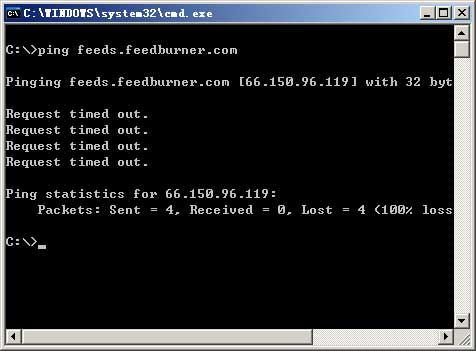
Now Chinese user unable to visit feeds.feedburner.com, when I try to ping feedburner from China, it will return "Request timed out".
When I issued traceroute requests to feedburner in China, I found the IP packets are blocked by 202.97.33.110. This IP address is a main router of China Telecom.
It's confirm that the Greate FireWall's IP blocking works. The FeedBurner is blocked in China again.
This is not the first time that Chinese authorities blocks FeedBurner, in August 1,2006, FeedBurner is also blocked temporarily, one day later it's came back, but now it's blocked again.
Why Chinese authorities blocks FeedBurner? Because Feedburner provides content from countless websites. It could conceivably carry some information the Chinese authorities think it shouldn't. So they try to blocks it, Although this will let them be against lot's of Chinese bloggers.
Although the Chinese bloggers could visit FeedBurner via proxy server, only few people use proxy in fact, maybe because proxy is slow and instable.
I wish FeedBurner will come back tomorrow.
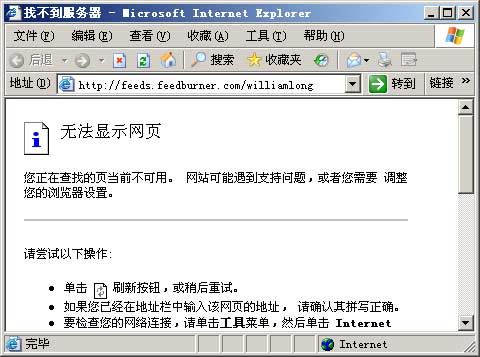
Now Chinese user unable to visit feeds.feedburner.com, when I try to ping feedburner from China, it will return "Request timed out".
When I issued traceroute requests to feedburner in China, I found the IP packets are blocked by 202.97.33.110. This IP address is a main router of China Telecom.
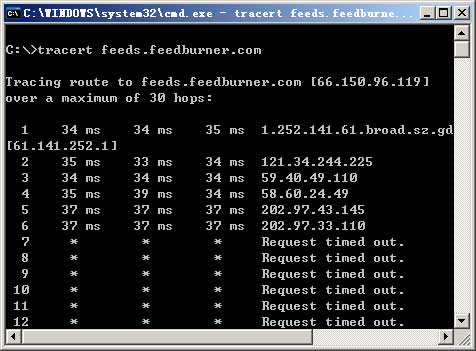
It's confirm that the Greate FireWall's IP blocking works. The FeedBurner is blocked in China again.
This is not the first time that Chinese authorities blocks FeedBurner, in August 1,2006, FeedBurner is also blocked temporarily, one day later it's came back, but now it's blocked again.
Why Chinese authorities blocks FeedBurner? Because Feedburner provides content from countless websites. It could conceivably carry some information the Chinese authorities think it shouldn't. So they try to blocks it, Although this will let them be against lot's of Chinese bloggers.
Although the Chinese bloggers could visit FeedBurner via proxy server, only few people use proxy in fact, maybe because proxy is slow and instable.
I wish FeedBurner will come back tomorrow.
Friday, August 24, 2007
Wordpress Plugin: Chinese PinYin Slug
The Chinese PinYin Slug Wordpress plugin convert Chinese UTF-8 character into English PinYin character from a post slugs to improve search engine optimization.
For example, when you publish a post with a title like this:
"Chinese PinYin"
Wordpress automatically assigns a long filename to your post, called a post slug:
/%e4%b8%ad%e6%96%87%e6%8b%bc%e9%9f%b3
PinYin Slug plugin convert Chinese character into PinYin character. With Chinese PinYin plugin activated, the slug for our example blog post would look like this:
/zhongwenpinyin
The slug is generated on saving a post (so you get a chance to look at it before publishing, and change it), or on publish. It won't overwrite an existing slug. You can force a new slug generation by deleting the existing one.
Installation
Download the PinYin Plugin and unzip to the '/wp-content/plugins/' directory. Activate the plugin through the 'Plugins' menu in WordPress. Now, when editing a post, give it a title and press Save and Continue Editing. The PinYin Slug plugin will generate a slug. If you edit it, the plugin will honor your slug and won't change it.
If you find this plugin useful, please, link to this page: Chinese PinYin Slug Wordpress Plugin.
For example, when you publish a post with a title like this:
"Chinese PinYin"
Wordpress automatically assigns a long filename to your post, called a post slug:
/%e4%b8%ad%e6%96%87%e6%8b%bc%e9%9f%b3
PinYin Slug plugin convert Chinese character into PinYin character. With Chinese PinYin plugin activated, the slug for our example blog post would look like this:
/zhongwenpinyin
The slug is generated on saving a post (so you get a chance to look at it before publishing, and change it), or on publish. It won't overwrite an existing slug. You can force a new slug generation by deleting the existing one.
Installation
Download the PinYin Plugin and unzip to the '/wp-content/plugins/' directory. Activate the plugin through the 'Plugins' menu in WordPress. Now, when editing a post, give it a title and press Save and Continue Editing. The PinYin Slug plugin will generate a slug. If you edit it, the plugin will honor your slug and won't change it.
If you find this plugin useful, please, link to this page: Chinese PinYin Slug Wordpress Plugin.
Tuesday, August 21, 2007
Google Launches Chinese Blog Search
Today, Google released a Chinese version of Google Blog Search, the URL is blogsearch.google.cn . The IP address of "Chinese Blog Search" is in Bei Jing. Now Chinese users can use Google blog search services in simplified Chinese language.
According to Google Chinese Blog, the Chinese version of Google Blog Search can track most of Chinese blog service providers,including Sina blog, Sohu blog, Tencent blog, 163.com blog, Baidu space, and other blog networks.
Meanwhile, Google blog search is also support most standalone blogs, such as WordPress, MovableType, Google Blogger blog.
The Chinese blog search is self-censoring, when I try to search "Tiananmen Square" in blogsearch.google.cn, I get no result. Google is not just translate BlogSearch's interface into Chinese language.
According to Google Chinese Blog, the Chinese version of Google Blog Search can track most of Chinese blog service providers,including Sina blog, Sohu blog, Tencent blog, 163.com blog, Baidu space, and other blog networks.
Meanwhile, Google blog search is also support most standalone blogs, such as WordPress, MovableType, Google Blogger blog.
The Chinese blog search is self-censoring, when I try to search "Tiananmen Square" in blogsearch.google.cn, I get no result. Google is not just translate BlogSearch's interface into Chinese language.
Monday, August 20, 2007
Google Answers Censorship In China
Today, Google and Tianya (a famous Chinese community website) launched a free Q&A service - "Tianya Answers". Some believe this is a strong competitors of "Baidu Zhidao" (the biggest Q&A site in China). In the bottom of "Tianya Answers" we can get "Google technology provide".
Social search has been Google's weaknesses, Google Answers is also defeat by Yahoo Answers. In China, Baidu Zhidao is the biggest Q&A service. Google launches Q&A service in China will enable Google to compete with Baidu. But in the "Tianya Answers", we found some of the very obvious Google-specific issues.
When we register a new account, we can get the following message : "Please note that according to Chinese laws, your IP information will be recorded for at least 60 days. And it will be will be provided to government agencies when we get the request."
That is mean, Google will complied with requests from the Chinese authorities to furnish information regarding an IP address of Google's users, and Google will only simply state that they just conform to the laws of the countries in which they operate.
Before in 2006, Google launches the Chinese version of its search engine to be censored (google.cn). Google use so-call SafeSearch filter used to keep people away from "bad" information, such as "subversive" material.
Google being in China helps itself more than China and simply does not fit into the "Don't Be Evil" mantra, but Google also known little about China's censorship. The "community website" is the "high-risk" project, they must face the work of looking out for and cleaning up "harmful information", if they do not get the "harmful information" out, they will be out. So they choice to collaborates with the Chinese regime.
Google "Don't Be Evil" ... Not in China.
Sources in Chinese .
Social search has been Google's weaknesses, Google Answers is also defeat by Yahoo Answers. In China, Baidu Zhidao is the biggest Q&A service. Google launches Q&A service in China will enable Google to compete with Baidu. But in the "Tianya Answers", we found some of the very obvious Google-specific issues.
When we register a new account, we can get the following message : "Please note that according to Chinese laws, your IP information will be recorded for at least 60 days. And it will be will be provided to government agencies when we get the request."
That is mean, Google will complied with requests from the Chinese authorities to furnish information regarding an IP address of Google's users, and Google will only simply state that they just conform to the laws of the countries in which they operate.
Before in 2006, Google launches the Chinese version of its search engine to be censored (google.cn). Google use so-call SafeSearch filter used to keep people away from "bad" information, such as "subversive" material.
Google being in China helps itself more than China and simply does not fit into the "Don't Be Evil" mantra, but Google also known little about China's censorship. The "community website" is the "high-risk" project, they must face the work of looking out for and cleaning up "harmful information", if they do not get the "harmful information" out, they will be out. So they choice to collaborates with the Chinese regime.
Google "Don't Be Evil" ... Not in China.
Sources in Chinese .
Tuesday, August 14, 2007
Survival For Standalone Blogs
This is my responded to Zousuper's discussion on standalone blog's survival(Thanks for danwei's translation). Later Zousuper's blog is blocked by Chinese government, but Zousuper is not render submissive, he set up a new host and blogging again. Here is the post:
The necessary conditions for setting up a blog on a separate domain in China - whether or not it is illegal, whether or not it requires registration - is currently a hotly debated issue. From the look of current policy, it seems that all standalone websites that have interactive information have to be registered.
There are issues of location here. If the server is overseas, then theoretically speaking registration is not necessary, but there is no way to guarantee that the server's IP will be accessible. Rose Luqiu's 1510 Blogs is a typical example. When a large proportion of visitors are from the mainland, then under normal circumstances a mainland server will be chosen. This is when we arrive the question of the blog's legality.
Here I'll summarize the steps and conditions for legally setting up a blog on a standalone domain; this should be basically the same in all major cities across the country.
Website registration is not a simple question. MII registration is just a basic registration, suitable for non-forum websites that do not have interactive information. If you think that MII registration will solve everything, then you are very wrong. Of course, you could close the comments section to your blog and voluntarily choose not to disseminate "harmful information"; in that case the MII registration would be enough. If your website allows leaving messages and exchanging information, and its traffic is low, you may be able to simply get by. In general, for normal small websites, MII registration is enough.
If your website traffic is relatively large, particularly if it is highly interactive, like a forum or a blog, then you'll face the appearance of so-called "harmful information." Normally, when you discover "harmful information," someone will be tasked with notifying the webmaster to delete it; it becomes a problem when it occurs frequently.
Strictly speaking, individuals are not permitted to provide BBS services on the Internet (interactive online services in which users provide information for release, including message boards, electronic whiteboards, e-forums, online chat services, and guestbooks) without formally registering or passing review by state communication administrators. To providing interactive forum and guestbook services, you must set up "technological measures for network security," in addition to registering with the PSB's Internet Supervision Center. This means a system for review, control, and deletion of information, as well as associated "computer security personnel."
Usually, registering with the PSB Internet Supervision Center is pretty complicated and drawn-out. The registration is vastly different from MII's: it is very strict. If your website supports BBS, forums, guestbook, or chat services, then you must provide the following materials:
The computer security personnel certificate is typically obtained by paying 660 yuan to be trained and tested. That means that if you want to write a blog, you must first pass the "security worker" exam. The registration form basically requires writing out your name, ID#, home address, mobile phone number, and place of work, so that if there are any problems you can be arrested on the spot. If you do not provide this information, then your registration may not pass.
After you've registered, you then face the work of looking out for and cleaning up "harmful information" - this is the responsibility of the "computer security personnel." Because the appearance of "harmful information" on a forum or blog is ultimately the responsibility of the webmaster, the PSB will carry out punishment against the webmaster according to the volume of "harmful information" that is circulated. Here you'll run into the issue of standards for punishment. Current punishment standards takes into account the number of registered users, the quantity of circulating information, the hit count, and illegal revenue; so long as one area exceeds the standard then you're determined to be in "extremely serious circumstances." An article clicked by one person is completely different from the same article clicked by 10,000 people; are you able to guarantee 24-hour review for your personal blog or forum? If you cannot, then hiding your webpage counters and your pageview numbers may cut down on some unwanted trouble. At the same time, you should keep your website income a secret; there is nothing good and a whole lot bad about making your website's income public. Under normal circumstances, this is a standard for determining punishment. The greater your website's income, the more serious the problem, and the worse off you will be.
Hence, if you have a forum or a guestbook system, you've got a hidden time bomb. "Harmful information" will cause a lot of trouble for the webmaster when it surfaces. So if you have a forum, it's best to put it on a separate domain name and move it to an overseas server unless you can guarantee you'll be online 24 hours a day to prevent every single bit of "harmful information" from being published. Otherwise you're giving them an angle to get you.. So high-risk systems like forums should be moved out. The same goes for guestbooks and comments to blog posts. If you cannot cut off comment functions, then you must implement keyword filters to turn every sensitive word into ××. Doing this will save you a bit of unnecessary trouble.
In short, there is currently no clear idea about the system for registering blogs, but for most blogs that have a fair number of comments and discussion, it's no good to simply register with MII; you have to go to the local PSB's website to register for it to have any effect. And you must maintain a good relationship with the local PSB. Whatever they want, you give it to them; don't antagonize them, and don't dispute matters of theory with them. Don't say anything when it's not your turn - it won't work, anyway.
The necessary conditions for setting up a blog on a separate domain in China - whether or not it is illegal, whether or not it requires registration - is currently a hotly debated issue. From the look of current policy, it seems that all standalone websites that have interactive information have to be registered.
There are issues of location here. If the server is overseas, then theoretically speaking registration is not necessary, but there is no way to guarantee that the server's IP will be accessible. Rose Luqiu's 1510 Blogs is a typical example. When a large proportion of visitors are from the mainland, then under normal circumstances a mainland server will be chosen. This is when we arrive the question of the blog's legality.
Here I'll summarize the steps and conditions for legally setting up a blog on a standalone domain; this should be basically the same in all major cities across the country.
Website registration is not a simple question. MII registration is just a basic registration, suitable for non-forum websites that do not have interactive information. If you think that MII registration will solve everything, then you are very wrong. Of course, you could close the comments section to your blog and voluntarily choose not to disseminate "harmful information"; in that case the MII registration would be enough. If your website allows leaving messages and exchanging information, and its traffic is low, you may be able to simply get by. In general, for normal small websites, MII registration is enough.
If your website traffic is relatively large, particularly if it is highly interactive, like a forum or a blog, then you'll face the appearance of so-called "harmful information." Normally, when you discover "harmful information," someone will be tasked with notifying the webmaster to delete it; it becomes a problem when it occurs frequently.
Strictly speaking, individuals are not permitted to provide BBS services on the Internet (interactive online services in which users provide information for release, including message boards, electronic whiteboards, e-forums, online chat services, and guestbooks) without formally registering or passing review by state communication administrators. To providing interactive forum and guestbook services, you must set up "technological measures for network security," in addition to registering with the PSB's Internet Supervision Center. This means a system for review, control, and deletion of information, as well as associated "computer security personnel."
Usually, registering with the PSB Internet Supervision Center is pretty complicated and drawn-out. The registration is vastly different from MII's: it is very strict. If your website supports BBS, forums, guestbook, or chat services, then you must provide the following materials:
- A copy of the computer security personnel certificate;
- Registered Internet user network security form;
- Providers of Internet services for news, publishing, education, health, pharmaceuticals, and medical equipment must be approved by the appropriate government agencies in accordance with laws and regulations, and must present the government approval documents at the time of registration.
The computer security personnel certificate is typically obtained by paying 660 yuan to be trained and tested. That means that if you want to write a blog, you must first pass the "security worker" exam. The registration form basically requires writing out your name, ID#, home address, mobile phone number, and place of work, so that if there are any problems you can be arrested on the spot. If you do not provide this information, then your registration may not pass.
After you've registered, you then face the work of looking out for and cleaning up "harmful information" - this is the responsibility of the "computer security personnel." Because the appearance of "harmful information" on a forum or blog is ultimately the responsibility of the webmaster, the PSB will carry out punishment against the webmaster according to the volume of "harmful information" that is circulated. Here you'll run into the issue of standards for punishment. Current punishment standards takes into account the number of registered users, the quantity of circulating information, the hit count, and illegal revenue; so long as one area exceeds the standard then you're determined to be in "extremely serious circumstances." An article clicked by one person is completely different from the same article clicked by 10,000 people; are you able to guarantee 24-hour review for your personal blog or forum? If you cannot, then hiding your webpage counters and your pageview numbers may cut down on some unwanted trouble. At the same time, you should keep your website income a secret; there is nothing good and a whole lot bad about making your website's income public. Under normal circumstances, this is a standard for determining punishment. The greater your website's income, the more serious the problem, and the worse off you will be.
Hence, if you have a forum or a guestbook system, you've got a hidden time bomb. "Harmful information" will cause a lot of trouble for the webmaster when it surfaces. So if you have a forum, it's best to put it on a separate domain name and move it to an overseas server unless you can guarantee you'll be online 24 hours a day to prevent every single bit of "harmful information" from being published. Otherwise you're giving them an angle to get you.. So high-risk systems like forums should be moved out. The same goes for guestbooks and comments to blog posts. If you cannot cut off comment functions, then you must implement keyword filters to turn every sensitive word into ××. Doing this will save you a bit of unnecessary trouble.
In short, there is currently no clear idea about the system for registering blogs, but for most blogs that have a fair number of comments and discussion, it's no good to simply register with MII; you have to go to the local PSB's website to register for it to have any effect. And you must maintain a good relationship with the local PSB. Whatever they want, you give it to them; don't antagonize them, and don't dispute matters of theory with them. Don't say anything when it's not your turn - it won't work, anyway.
Sources:William Long: The way for standalone blogs to survive (Chinese)
Friday, August 10, 2007
The Secret Of Internet Censorship In China
As we know, whether blog or forum is censored in China, people can not say anything in China. What can be said, and what can not be said is a question for all of us, today, I will introduce some of the legal basis in China: "Computer Information Network and Internet Security, Protection and Management Regulations"
The management regulations is approved by the State Council of China on December 11 1997 and promulgated by the Ministry of Public Security of China on December 30, 1997. This is a legal basis. In that regulations, a detailed definition of "harmful information" the specific meaning, publishing "harmful information" is forbidden. Then what is the "harmful information"?
According to the Section Five of the Act provides that no individual may use the Internet to create, replicate, retrieve, or spread the following kinds of information:
(1) Inciting to resist or breaking the Constitution or laws or the implementation of administrative regulations;
(2) Inciting to overthrow the government or the socialist system;
(3) Inciting division of the country, harming national unification;
(4) Inciting hatred or discrimination among nationalities or harming the unity of the nationalities;
(5) Making falsehoods or distorting the truth, spreading rumors, destroying the order of society;
(6) Promoting feudal superstitions, sexually suggestive material, gambling, violence, murder,
(7) Terrorism or inciting others to criminal activity; openly insulting other people or distorting the truth to slander people;
(8) Injuring the reputation of state organs;
(9) Other activities against the Constitution, laws or administrative regulations.
Evidently, these nine categories of information is harmful information. I think, in one word, any threat to social stability statements are "harmful information". Anyone want to publishing "harmful information" is illegal. This is the so-called "Internet censorship in China", If you knew about this, you will be able to understand those weird things in China's cyberspace.
The management regulations is approved by the State Council of China on December 11 1997 and promulgated by the Ministry of Public Security of China on December 30, 1997. This is a legal basis. In that regulations, a detailed definition of "harmful information" the specific meaning, publishing "harmful information" is forbidden. Then what is the "harmful information"?
According to the Section Five of the Act provides that no individual may use the Internet to create, replicate, retrieve, or spread the following kinds of information:
(1) Inciting to resist or breaking the Constitution or laws or the implementation of administrative regulations;
(2) Inciting to overthrow the government or the socialist system;
(3) Inciting division of the country, harming national unification;
(4) Inciting hatred or discrimination among nationalities or harming the unity of the nationalities;
(5) Making falsehoods or distorting the truth, spreading rumors, destroying the order of society;
(6) Promoting feudal superstitions, sexually suggestive material, gambling, violence, murder,
(7) Terrorism or inciting others to criminal activity; openly insulting other people or distorting the truth to slander people;
(8) Injuring the reputation of state organs;
(9) Other activities against the Constitution, laws or administrative regulations.
Evidently, these nine categories of information is harmful information. I think, in one word, any threat to social stability statements are "harmful information". Anyone want to publishing "harmful information" is illegal. This is the so-called "Internet censorship in China", If you knew about this, you will be able to understand those weird things in China's cyberspace.
Sources:William Long: The internet censership's law basis (Chinese)
Wednesday, August 8, 2007
About This Blog
Moonlight Blog is a Chinese news website and Internet news blog founded by William Long. The website's primary focus is social media news, but also covers news and developments in mobile, entertainment, online video, business, web development, technology and gadgets. Moonlight Blog was launched by William Long from his home in Guangdong, China in January 2005.
Moonlight Blog English Version is my first blog in English, which is set up using WordPress, in this blog, I'll translate some of my Chinese blog into English, also, I'll report the information about Chinese blogosphere, Chinese GreatFireWall, China society and people. Help you meet a real China.
Moonlight Blog English Version is my first blog in English, which is set up using WordPress, in this blog, I'll translate some of my Chinese blog into English, also, I'll report the information about Chinese blogosphere, Chinese GreatFireWall, China society and people. Help you meet a real China.
Subscribe to:
Posts (Atom)